
NetCatcherPro1.5.0 - Download
You'll be able to download in few seconds.
Publisher Description
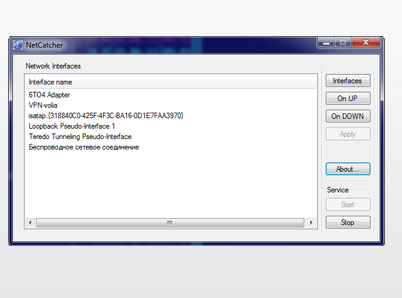
Do you use VPN? So surely you had cases when it was necessary to perform some action after the VPN-connection has been established, for example to run some programs. If you are a system administrator, than from time to time you have to add or to remove routes when VPN-connection is going up or down.
With the new Anseko NetCatcher it has become easy just like never before!
Try Anseko NetCatcher:
- Simple and clear interface;
- Run any commands in network interface(s) up/down event;
- Autostart;
- Does not require special knowledge;
- It's free!
Example of use
Let's say you work in your home network and you need to establish VPN-connection to access the corporate network of your company. However, you want to use an access to the internet through your ISP, and use a VPN only to access the corporate network.
Assume that your PC in your ISP has got 10.10.20.5 IP-address, and a corporate network of your company uses 10.50.50.9 and 192.168.112.32 IP-adresses correspondently. Assume also that 1.1.1.1 is your VPN-gateway and 1.1.1.2 is your VPN-connection IP-address.
If you specify "use as default route" in VPN-connections settings window, then access to the Internet will be through the VPN, a corporate network of your company. If you do not enable this option, you can not get to the above addresses of the computers in your corporate network.
So what should you do? With Anseko NetCatcher it could be solved very easily:
- Turn off the option "use as default route" in the settings of VPN-connections
- Choose the name of your VPN-connection in a window NetCatcher "Network Interfaces"
- Write commands
route add 10.10.20.5 mask 255.255.255.255 $IP
route add 10.50.50.9 mask 255.255.255.255 1.1.1.1
in a window NetCatcher "onUP"
- Press "Apply" button
That's it! Now, routes will be added automatically when VPN-connection is established. Instead of IP you can use $IP and $GW - NetCatcher will replace them with actual value.
About NetCatcherPro
This Network Monitoring program is available in English. It was last updated on 29 September, 2026. NetCatcherPro is compatible with the following operating systems: Windows.
The company that develops NetCatcherPro is anseko. The latest version released by its developer is 1.5.0.
The download we have available for NetCatcherPro has a file size of N/A. Just click the green Download button above to start the downloading process. The program is listed on our website since 2011-07-21 and was downloaded 0 times. We have already checked if the download link is safe, however for your own protection we recommend that you scan the downloaded software with your antivirus. Your antivirus may detect the NetCatcherPro as malware if the download link is broken.
How to install NetCatcherPro on your Windows device:
- Click on the Download button on our website. This will start the download from the website of the developer.
- Once the NetCatcherPro is downloaded click on it to start the setup process (assuming you are on a desktop computer).
- When the installation is finished you should be able to see and run the program.
Program Details
System requirements
Download information
Pricing
Version History
version 1.5.0
posted on 2011-07-21
first release
Disclaimer
External Download
We do not host NetCatcherPro on our servers. We did not scan it for viruses, adware, spyware or other type of malware. This app is hosted by the software publisher and passed their terms and conditions to be listed there. We recommend caution when installing it.
The external download link for NetCatcherPro is provided to you by apps112.com without any warranties, representations or guarantees of any kind, so access it at your own risk.
If you have questions regarding this particular app contact the publisher directly. For questions about the functionalities of apps112.com contact us.
